TensorFeed AI Status Is Now a Chrome Extension. Live AI Health Sits in Your Toolbar.
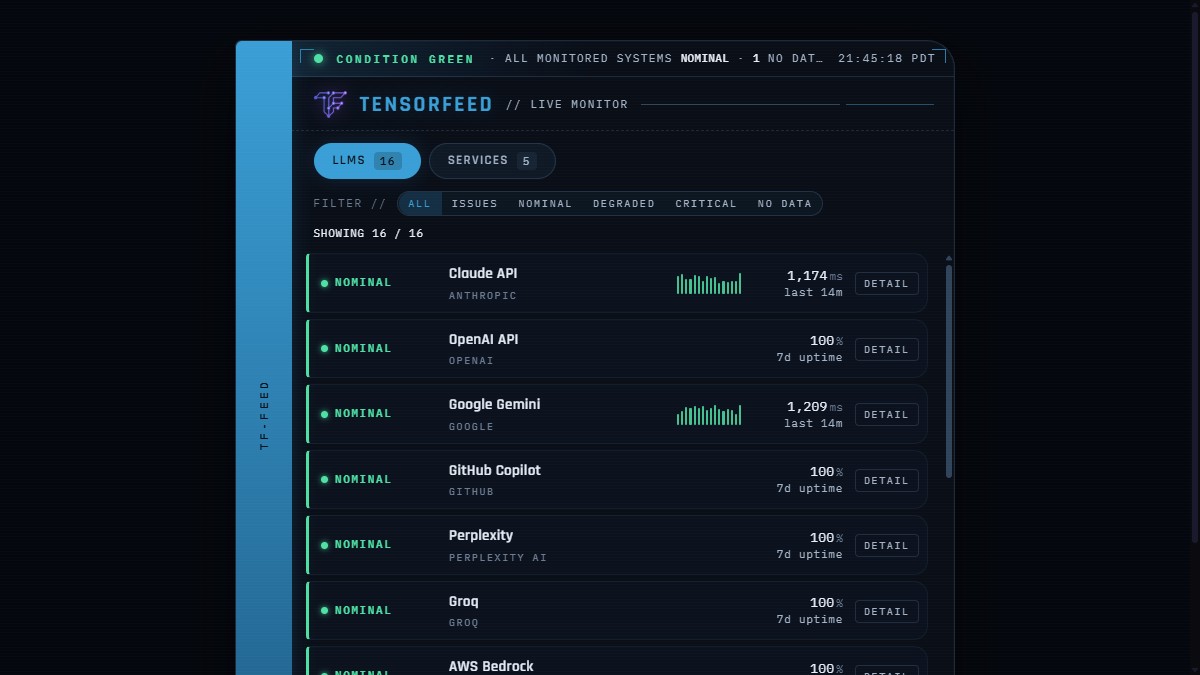
As of today the TensorFeed Live Monitor is a Chrome extension, approved and public on the Chrome Web Store. One click installs a toolbar popup with real-time operational status and real p95 latency for every major AI provider, plus a passive badge that quietly turns amber or red the moment a provider degrades. Same live data, same honest-by-construction rules as the embeddable widget, in the surface that already lives next to your address bar.
Install TensorFeed AI Status on Chrome or Firefox. Free, no account, no tracking, no host-page permissions. It only talks to tensorfeed.ai.
Why a toolbar popup is the right surface
We shipped the embeddable widget five days ago on the argument that the right surface for an AI health signal is the one you do not have to navigate to. An iframe on a status page is honest and useful, but a developer still has to remember to look. A toolbar extension closes the loop the other direction: the signal comes to you. When everything is nominal, the icon is calm. When a provider degrades, the badge changes color before you have any reason to suspect your own code is broken. Mean time to “is it them or is it me” goes from minutes of triage to a glance at the chrome of the browser itself.
That is also the case for distribution. A widget compounds when other people embed it. An extension compounds when individual developers install it. Different fan-outs, same underlying truth, both pointing back at the same canonical feeds. Browser extension makes four distribution channels for the same data: the public dashboard, the embeddable widget, the npm component, and now the Chrome popup.
The detail that almost killed the review
Chrome Web Store review is automated, strict, and unforgiving in ways that matter. Our first submission tripped a content-security-policy edge case: the extension popup embedded the same widget the public site embeds, and the widget’s frame-ancestors directive had been written assuming only web origins. The Chrome extension context is chrome-extension://<id>, which is technically a frame ancestor and was technically not on the allow-list. The fix was a one-line CSP change at the widget origin to permit the extension scheme. Boring. Important. The kind of thing you only catch by actually shipping into a real review pipeline rather than testing locally.
The discipline that fixed it is the same discipline behind the widget’s no-fake-numbers rule: the popup either renders real live data from the same hardened endpoint everyone else hits, or it renders nothing. We did not paper over the CSP failure with a screenshot fallback or a cached snapshot. The popup is live or it is not present. That is what the review approved.
What it does, exactly
Click the toolbar icon and you get the full Live Monitor: every LLM provider we cover, every service we monitor, with operational state, measured p95 latency where we actively probe, and real seven-day uptime where we do not. The detail control on every row deep-links to the per-provider page on TensorFeed for the full graph. Nothing in the popup is invented; if we do not have a number we do not draw one.
The badge is the part that earns its keep. While you work, the extension polls the same /api/status/summary the dashboard does and updates the badge color: clear when everything is nominal, amber on degradation, red on a critical incident, grey when we are explicitly missing data for a provider rather than asserting a status we do not have. The cry-wolf rule the widget enforces holds in the extension too: a provider with no authoritative status source is labeled NO DATA and is not counted as an outage. Healthy providers do not get painted red because of our probe limits.
Permissions and what we do not ask for
The extension requests two things and only two things: alarms so the background worker can wake every few minutes to update the badge, and host access to https://tensorfeed.ai/* so the popup and worker can fetch our public status feeds. No tabs, no content scripts, no access to any other site, no analytics, no telemetry beacon. The set of things it can see is: TensorFeed’s own public JSON. That is it. The review passed in part because the manifest is small enough that there is no ambiguity about what is going on.
Where this goes
Firefox build is queued next, same codebase, same manifest with the gecko-specific block already in place. After that the question is whether the badge should escalate from passive color change to an opt-in notification when a provider you have starred goes critical. The argument against is that notifications are noise debt; the argument for is that someone running an agent stack in production actually wants to know the second Claude starts returning 5xx, and the passive badge requires looking up. We will probably ship that gated behind explicit opt-in for the providers you mark as load- bearing, not on by default.
For now: it is live, it is approved, it is free, and it is one click. Install it from the Chrome Web Store. If you want the embeddable version for your own site instead, the snippet, npm component, and live preview are at tensorfeed.ai/embed. If you are building agents, the same truth is one fetch away at the developer API.